PHOTO TO COUNTED CROSS STITCH

How to Turn a Photo of Your Pet into a Cross Stitch Pattern

Follow four real steps with a cat photo, from cropping and tracing whiskers to generating a cross stitch preview you can check in your browser.

Free preview · Your photo stays on your device

Cross stitch chart preview of a an orange kitten
Example chart 150 × 100 stitches

THE WORKBENCH

Make your pattern

Free preview

Source photo

Your photo

Drag a box over the area you want to stitch.

Pattern preview

Thread colors
—
Total stitches
—
Isolated stitches
—

PDF export sends the stitch chart so you can download it again.

From cat photo to counted cross stitch

These screenshots show the same cat photo at each step. Follow along with your own photo in the pattern maker above. Photo by Alexios Katsarakis on Pexels.

  1. Choose a photo and crop around the face

    Choose a sharp photo where you can see both eyes. Adjust the crop box around the head. Leave room for the whiskers you want to stitch, then select Apply crop.
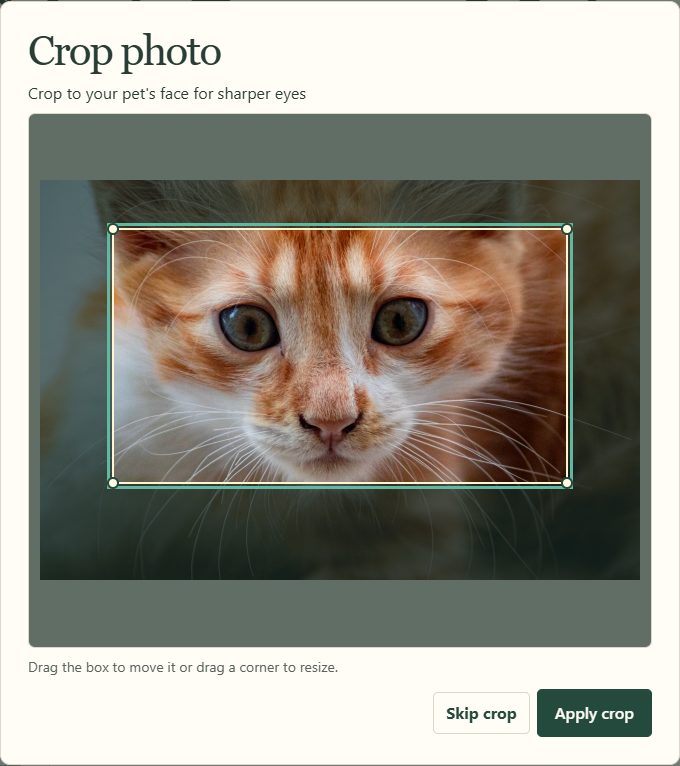
    The ChartMyFloss crop box around the cat’s face
  2. Mark the eyes and nose

    Tap each eye, then the nose. ChartMyFloss adds a protection area around each point.
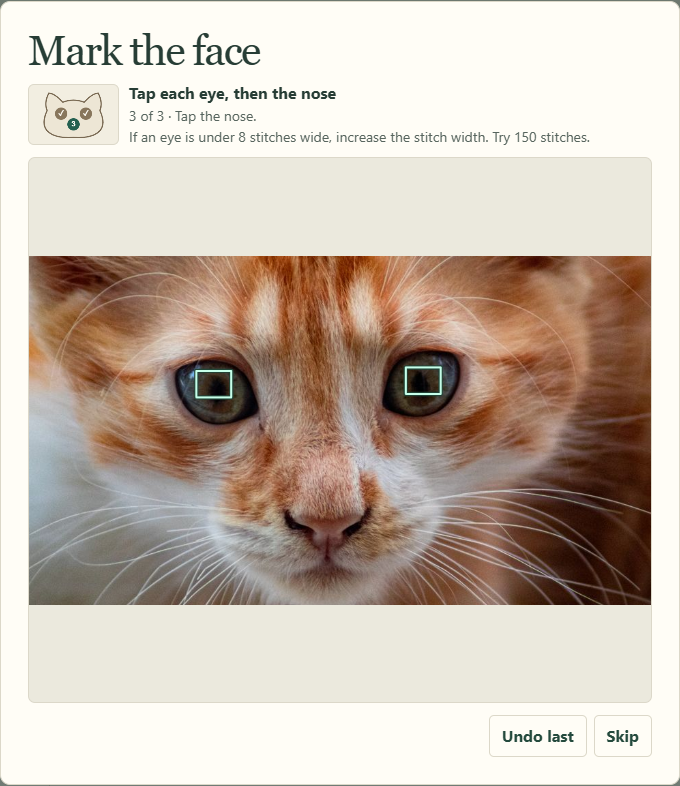
    Two marks over the cat’s irises during the face marking step
  3. Trace the whiskers you want to keep

    In Draw whiskers, trace each whisker with a separate stroke. Select Generate preview when you finish. You can also skip this step.
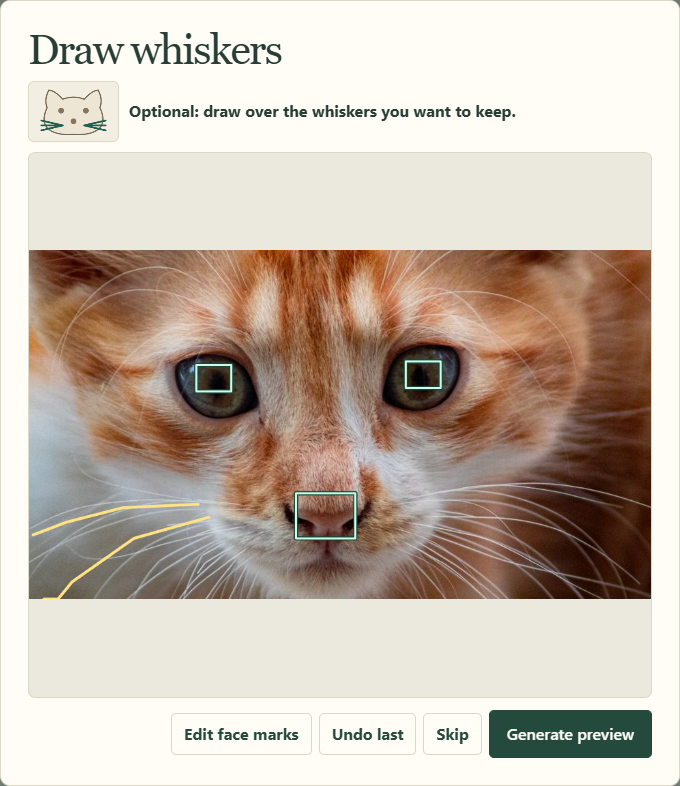
    Traces follow two whiskers on the left side of the cat’s face
  4. Check the preview and pick a size

    Open the preview and zoom in to check the eyes, nose and whiskers. If an eye spans fewer than eight stitches, tighten the crop or increase the stitch width. Use Compare sizes to check the finished dimensions and fabric allowance.
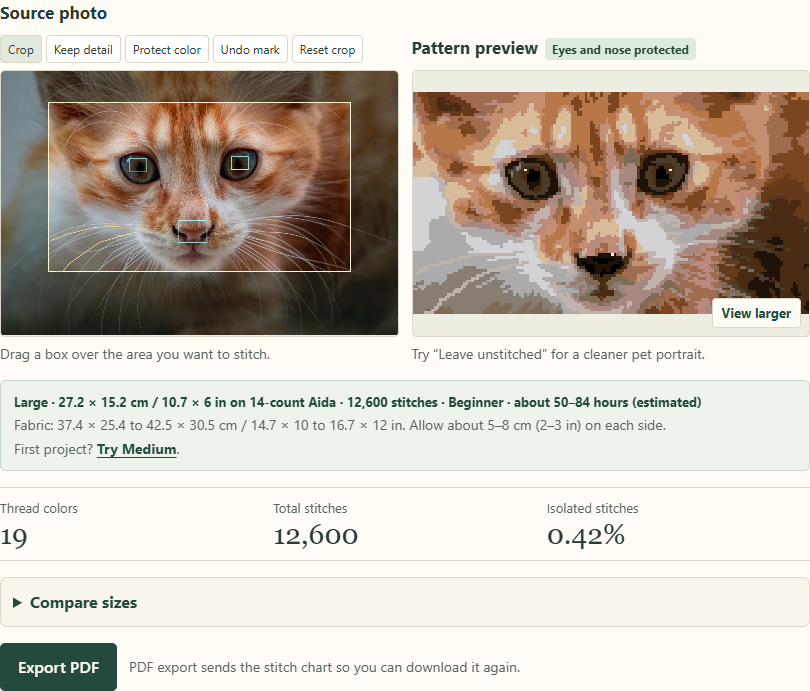
    The marked cat photo, stitch preview and 14-count Aida dimensions

Make a pattern from your photo

PDF pricing

One PDF · $4.99 USD

Five PDFs · $9.99 USD · Credits never expire.

Unlock your chart

Printable symbol chart, page map and DMC thread key.

Restore purchase

Crop photo

Crop to your pet's face for sharper eyes

Drag the box to move it or drag a corner to resize.

Mark the face

Tap each eye, then the nose

If an eye is under 8 stitches wide, increase the stitch width. Try 150 stitches.

Pattern preview

100%

Zoom to see each stitch. Drag to move around.

Edit subject

Paint over areas to add or remove them. Shaded areas are background.

Protected face marks stay stitched.

How can we help?

How do I print at 100%?

In your PDF viewer’s print dialog, choose Actual size or set Scale to 100%. Turn off Fit to page and Shrink oversized pages.

Should I choose US Letter or A4?

Match the PDF to the paper in your printer. Use US Letter for 8.5 × 11 inches or A4 for 210 × 297 mm. Select that paper size in both the PDF export and printer settings.

How do I restore a purchase?

Open Restore purchase and enter your payment email or the Dodo payment reference from your receipt. Open the link sent to your payment inbox to see your remaining credits and previously downloaded PDFs.

When can I request a refund?

You can request a full refund within 14 days if you have used zero credits from that purchase. Once you use any credit, the purchase is generally final. Your applicable consumer rights still apply. See the Refund Policy or email hello@chartmyfloss.com.

Does my pattern photo get uploaded?

Your source photo stays in your browser. PDF export sends the stitch grid and thread choices to the server so you can download the chart again. If you attach a screenshot to Help or a finished-piece photo to a review, that attachment is sent to ChartMyFloss.

What if my PDF won’t open?

Save the file first and open it in a PDF reader, such as Adobe Acrobat Reader or your browser’s PDF viewer. If the file still won’t open, try downloading it again from Restore purchase. If you still need help, send us your order reference and the error you see.

Read the full FAQ

Contact support

JPG, PNG, or WebP · up to 10 MB

Leave payment card details out of your message and screenshot.

How was your pattern?

Rate your PDF

JPG, PNG, or WebP · up to 10 MB. Your photo goes to the ChartMyFloss team.